> ## Documentation Index
> Fetch the complete documentation index at: https://docs.acedata.cloud/llms.txt
> Use this file to discover all available pages before exploring further.
# OpenAI Responses API の申請および使用
> OpenAI generation API guide - Ace Data Cloud
OpenAI は最近、モデル応答を作成するためのインターフェースを提供しました。テキストまたは画像入力を提供して、テキストまたは画像出力を生成します。モデルに独自のカスタムコードを呼び出させたり、web 検索やファイル検索などの組み込みツールを使用させたりして、独自のデータをモデル応答の入力として使用できます。
本ドキュメントでは主に OpenAI Responses API 操作の使用フローを紹介し、これを利用することで、公式 OpenAI のモデル応答作成機能を簡単に使用できます。
## GPT-6.1 Sol
`model: "gpt-6.1-sol"` を使用してこのモデルを選択します。ストリーミング出力、関数呼び出し、構造化出力、画像入力をサポートしています。初回公開から1週間以内は、認証済みの ACE T1+ 保有者(少なくとも 100,000 ACE)または認可されたユーザーにのみ公開されます。具体的な公開時期はコンソールのアクセス案内に従ってください。
推論レベルは `low`、`medium`、`high`、`xhigh`、`max` をサポートし、現時点では `none` または `minimal` はサポートしていません。`reasoning: {"effort": "low"}` から始めることを推奨します。入力が 272,000 tokens を超える場合、リクエスト全体に長文コンテキスト価格が適用され、料金はコンソールの現在の価格に従います。
## 申請フロー
OpenAI Responses API を使用するには、まず [Ace Data Cloud コンソール](https://platform.acedata.cloud/console/applications) にアクセスして API Token を取得し、予備として保管してください。

まだログインまたは登録していない場合は、自動的にログインページへ移動し、登録とログインを案内します。完了後、自動的に現在のページへ戻ります。
**1つの API Token でプラットフォームのすべてのサービスを呼び出すことができ、サービスごとに個別に申請する必要はありません。** 初回申請時には無料クレジットが付与され、無料で体験できます。クレジットが不足した場合は、[コンソール](https://platform.acedata.cloud/console/coin) で共通残高をチャージできます。
> 📘 完全なドキュメント:[OpenAI Responses API →](https://platform.acedata.cloud/documents/openai-responses)
## 基本的な使用方法
続いて、画面上で対応する内容を入力できます。図のとおりです。
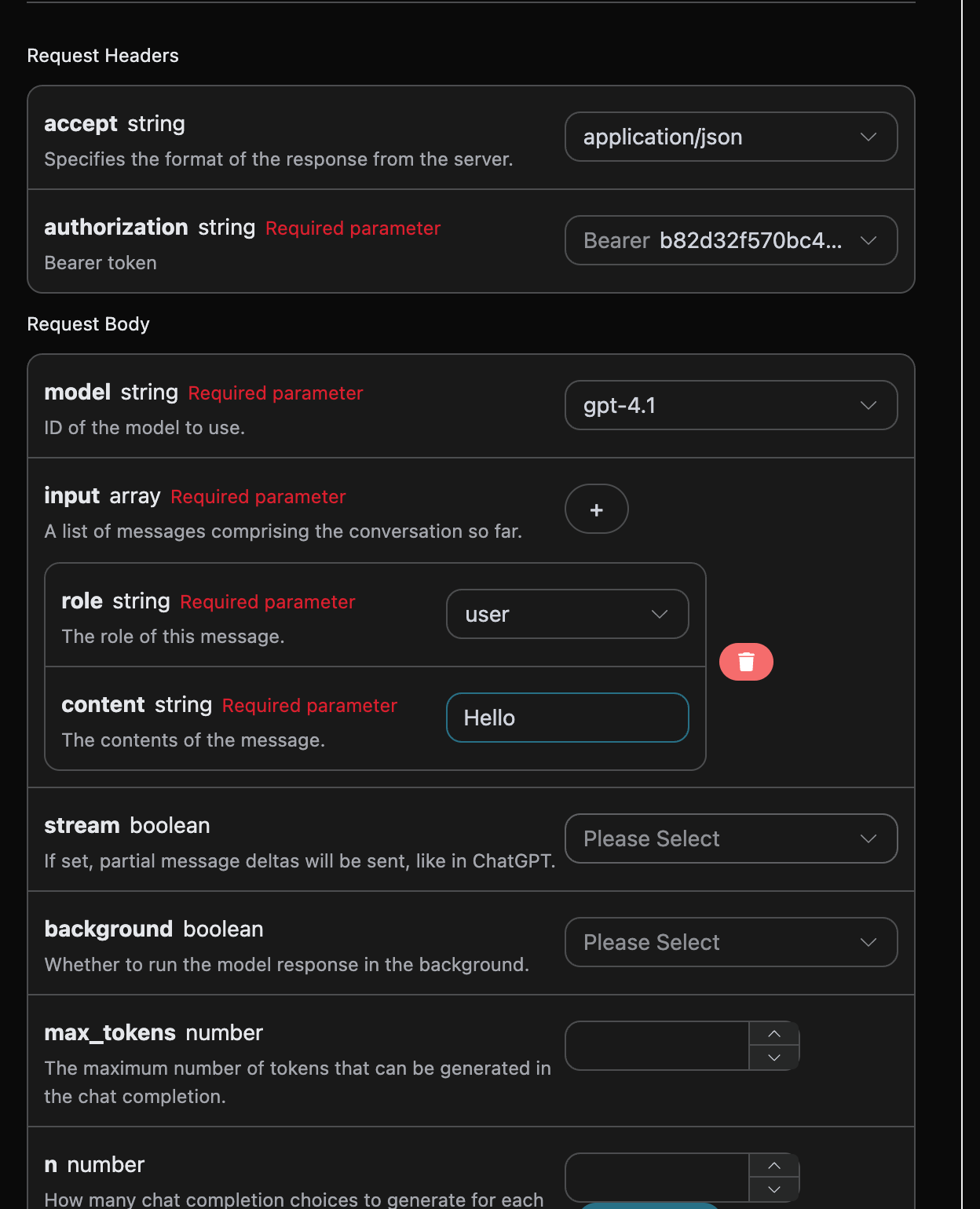
このインターフェースを初めて使用する際は、少なくとも3つの内容を入力する必要があります。1つは `authorization` で、ドロップダウンリストから直接選択できます。もう1つのパラメータは `model` で、`model` は OpenAI ChatGPT 公式サイトのモデルカテゴリを選択するものです。ここでは主に20種類のモデルがあり、詳細は提供しているモデルをご確認ください。最後のパラメータは `input` で、`input` は入力する質問文の配列です。これは配列であり、複数の質問文を同時にアップロードできることを示しています。各質問文には `role` と `content` が含まれ、そのうち `role` は質問者の役割を表します。3種類の役割を提供しており、それぞれ `user`、`assistant`、`system` です。もう一方の `content` は、質問する具体的な内容です。
同時に、右側には対応する呼び出しコードが生成されていることに気付くでしょう。コードをコピーして直接実行することも、「Try」ボタンを直接クリックしてテストすることもできます。
よく使用するオプションパラメータ:
* `max_tokens`:1回の返信における最大 token 数を制限します。
* `temperature`:生成のランダム性。0-2 の間で、値が大きいほど発散します。
* `n`:一度に生成する候補返信の数。
* `response_format`:返却形式の設定。
* `tools`:関数/ツール呼び出しの定義。
* `background`:バックグラウンドで非同期実行するかどうか。
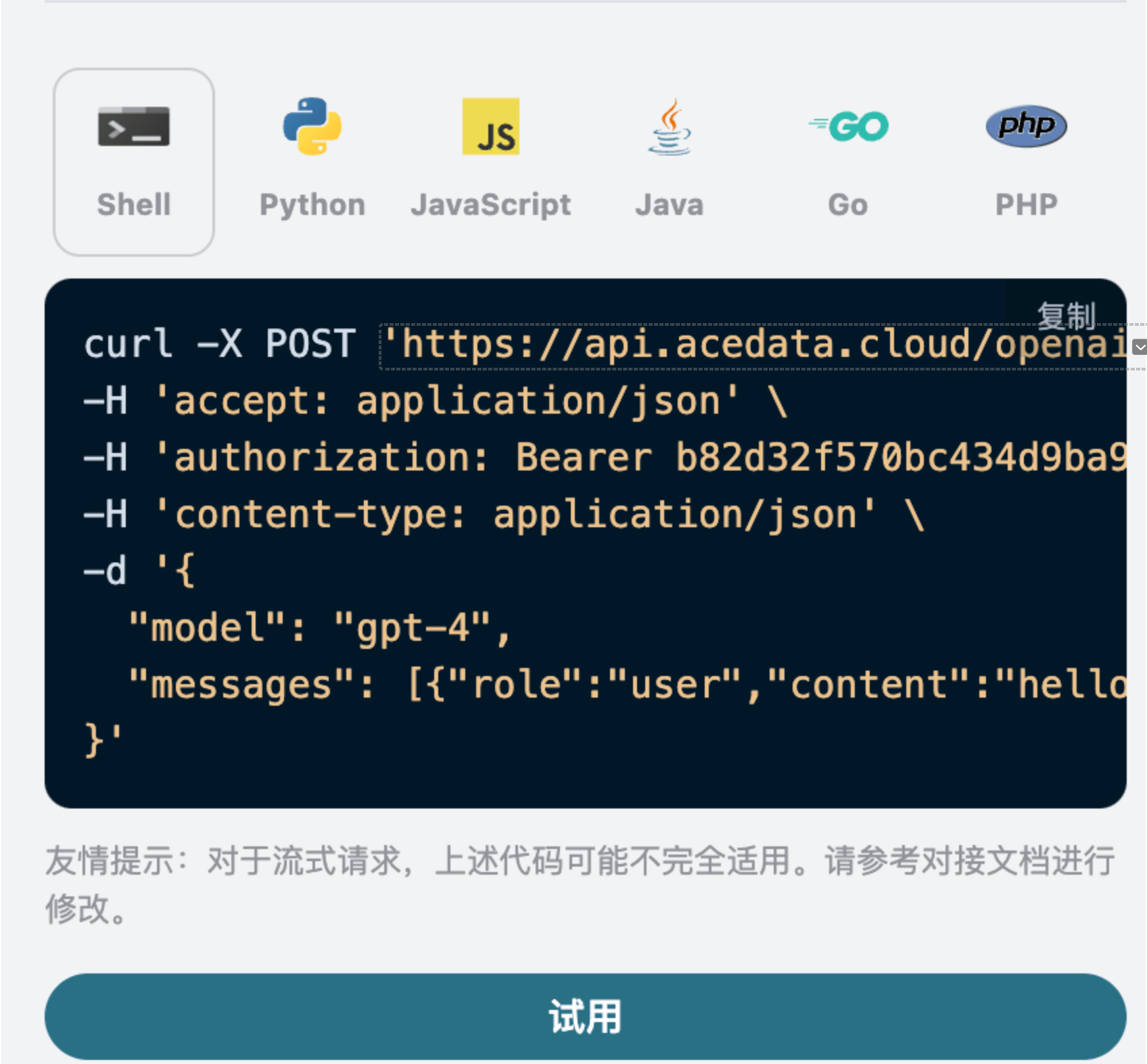
呼び出し後、返却結果は以下のとおりです。
```json theme={null}
{
"id": "resp_68a98322e3c88191a027de2711a02a490554cad0b36c0400",
"object": "response",
"created_at": 1755939618,
"status": "completed",
"background": false,
"content_filters": null,
"error": null,
"incomplete_details": null,
"instructions": null,
"max_output_tokens": null,
"max_tool_calls": null,
"model": "gpt-5.5",
"output": [
{
"id": "msg_68a98323422c8191a7f383eea48ba5160554cad0b36c0400",
"type": "message",
"status": "completed",
"content": [
{
"type": "output_text",
"annotations": [],
"text": "Hello! How can I assist you today?"
}
],
"role": "assistant"
}
],
"parallel_tool_calls": true,
"previous_response_id": null,
"prompt_cache_key": null,
"reasoning": {
"effort": null,
"summary": null
},
"safety_identifier": null,
"service_tier": "default",
"store": true,
"temperature": 1,
"text": {
"format": {
"type": "text"
}
},
"tool_choice": "auto",
"tools": [],
"top_p": 1,
"truncation": "disabled",
"usage": {
"input_tokens": 8,
"input_tokens_details": {
"cached_tokens": 0
},
"output_tokens": 10,
"output_tokens_details": {
"reasoning_tokens": 0
},
"total_tokens": 18
},
"user": null,
"metadata": {}
}
```
返却結果には複数のフィールドがあり、以下のとおりです:
* `id`、今回の対話タスクを生成する ID であり、今回の対話タスクを一意に識別するために使用されます。
* `model `、選択した OpenAI ChatGPT 公式サイトのモデル。
* `output`、ChatGPT が質問文に対して与えた回答情報。
* `usage `:今回の質疑応答における token の統計情報。
このうち `output` には ChatGPT の回答情報が含まれており、その中の `output` は ChatGPT です。図のとおり確認できます。
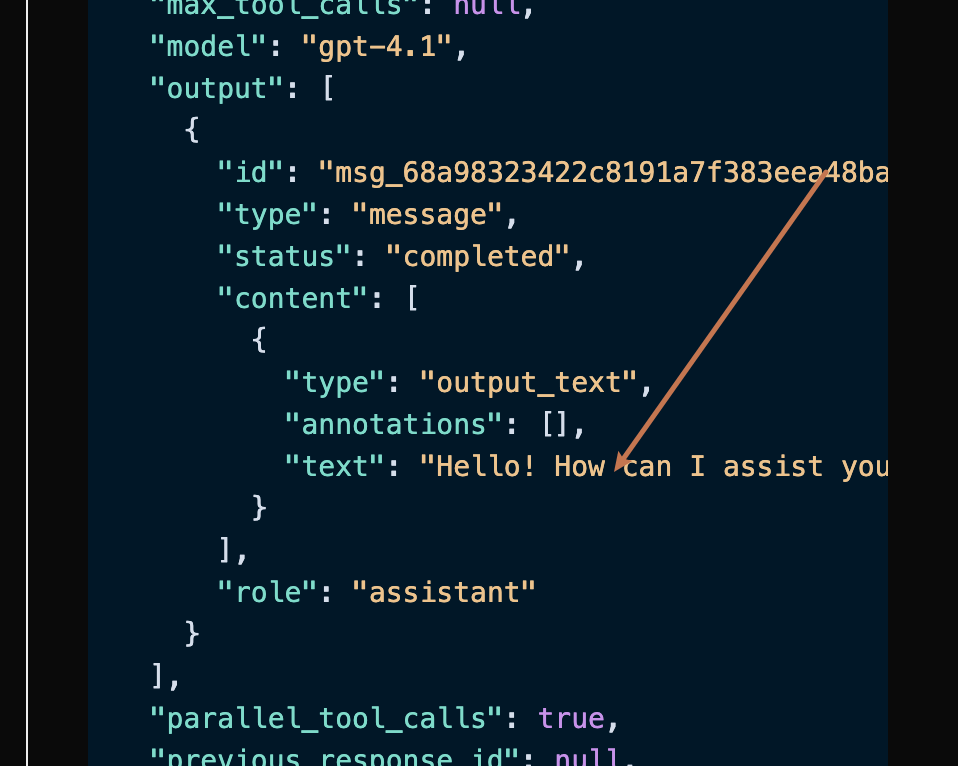
確認できるように、`output` 内の `content` フィールドには ChatGPT の返信の具体的な内容が含まれています。
## ストリーミング応答
このインターフェースはストリーミング応答もサポートしており、これは Web ページとの連携に非常に役立ち、Web ページで一文字ずつ表示する効果を実現できます。
ストリーミングで応答を返したい場合は、リクエストヘッダー内の `stream ` パラメータを変更し、`true` に変更できます。
変更は図のとおりですが、呼び出しコードもストリーミング応答をサポートするために対応する変更が必要です。
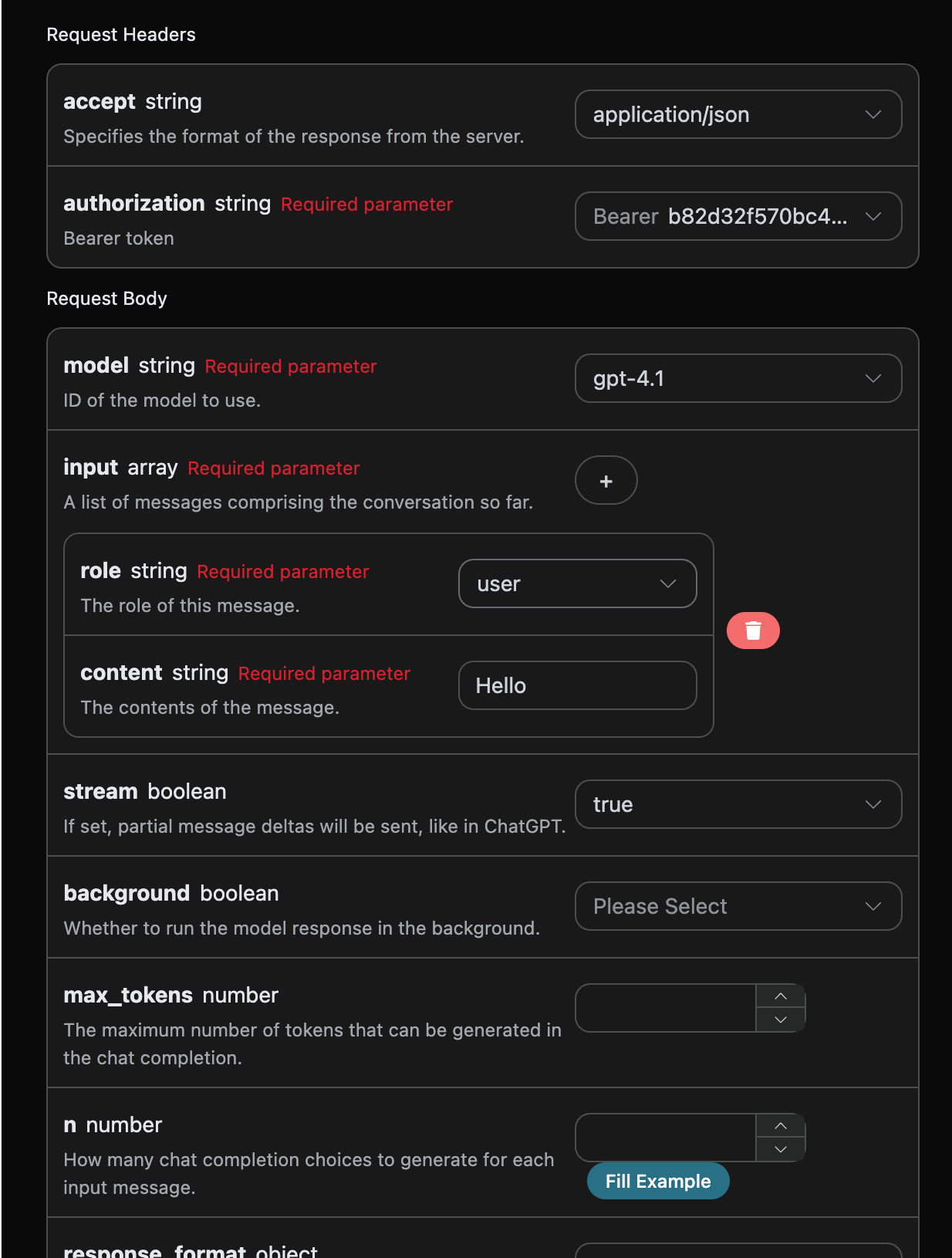
`stream` を `true` に変更すると、API は対応する JSON データを1行ずつ返します。コードレベルでは、1行ずつの結果を取得するために対応する変更を行う必要があります。
Python サンプル呼び出しコード:
```python theme={null}
import requests
url = "https://api.acedata.cloud/openai/responses"
headers = {
"accept": "application/json",
"authorization": "Bearer {token}",
"content-type": "application/json"
}
payload = {
"model": "gpt-4.1",
"input": [{"role":"user","content":"Hello"}],
"stream": True
}
response = requests.post(url, json=payload, headers=headers)
print(response.text)
```
出力結果は以下のとおりです:
```json theme={null}
data: {"type": "response.created", "sequence_number": 0, "response":
{"id": "resp_68a9837bb9bc8190b403947311db6faa0721186e8fbb89d0", "object": "response", "created_at": 1755939707, "status": "in_progress", "background": false, "content_filters": null, "error": null, "incomplete_details": null, "instructions": null, "max_output_tokens": null, "max_tool_calls": null, "model": "gpt-4.1-data", "output": [], "parallel_tool_calls": true, "previous_response_id": null, "prompt_cache_key": null, "reasoning": {"effort": null, "summary": null}, "safety_identifier": null, "service_tier": "auto", "store": true, "temperature": 1.0, "text": {"format": {"type": "text"}}, "tool_choice": "auto", "tools": [], "top_p": 1.0, "truncation": "disabled", "usage": null, "user": null, "metadata": {}}, "model": "gpt-4.1"}
data: {"type": "response.in_progress", "sequence_number": 1, "response": {"id": "resp_68a9837bb9bc8190b403947311db6faa0721186e8fbb89d0", "object": "response", "created_at": 1755939707, "status": "in_progress", "background": false, "content_filters": null, "error": null, "incomplete_details": null, "instructions": null, "max_output_tokens": null, "max_tool_calls": null, "model": "gpt-4.1-data", "output": [], "parallel_tool_calls": true, "previous_response_id": null, "prompt_cache_key": null, "reasoning": {"effort": null, "summary": null}, "safety_identifier": null, "service_tier": "auto", "store": true, "temperature": 1.0, "text": {"format": {"type": "text"}}, "tool_choice": "auto", "tools": [], "top_p": 1.0, "truncation": "disabled", "usage": null, "user": null, "metadata": {}}, "model": "gpt-4.1"}
data: {"type": "response.output_item.added", "sequence_number": 2, "output_index": 0, "item": {"id": "msg_68a9837c49f081908f568bf9c6065c620721186e8fbb89d0", "type": "message", "status": "in_progress", "content": [], "role": "assistant"}, "model": "gpt-4.1"}
data: {"type": "response.content_part.added", "sequence_number": 3, "item_id": "msg_68a9837c49f081908f568bf9c6065c620721186e8fbb89d0", "output_index": 0, "content_index": 0, "part": {"type": "output_text", "annotations": [], "text": ""}, "model": "gpt-4.1"}
data: {"type": "response.output_text.delta", "sequence_number": 4, "item_id": "msg_68a9837c49f081908f568bf9c6065c620721186e8fbb89d0", "output_index": 0, "content_index": 0, "delta": "こんにちは", "model": "gpt-4.1"}
data: {"type": "response.output_text.delta", "sequence_number": 5, "item_id": "msg_68a9837c49f081908f568bf9c6065c620721186e8fbb89d0", "output_index": 0, "content_index": 0, "delta": "!", "model": "gpt-4.1"}
data: {"type": "response.output_text.delta", "sequence_number": 6, "item_id": "msg_68a9837c49f081908f568bf9c6065c620721186e8fbb89d0", "output_index": 0, "content_index": 0, "delta": " 本日はどのように", "model": "gpt-4.1"}
data: {"type": "response.output_text.delta", "sequence_number": 7, "item_id": "msg_68a9837c49f081908f568bf9c6065c620721186e8fbb89d0", "output_index": 0, "content_index": 0, "delta": " お手伝い", "model": "gpt-4.1"}
data: {"type": "response.output_text.delta", "sequence_number": 8, "item_id": "msg_68a9837c49f081908f568bf9c6065c620721186e8fbb89d0", "output_index": 0, "content_index": 0, "delta": "でき", "model": "gpt-4.1"}
data: {"type": "response.output_text.delta", "sequence_number": 9, "item_id": "msg_68a9837c49f081908f568bf9c6065c620721186e8fbb89d0", "output_index": 0, "content_index": 0, "delta": "ます", "model": "gpt-4.1"}
data: {"type": "response.output_text.delta", "sequence_number": 10, "item_id": "msg_68a9837c49f081908f568bf9c6065c620721186e8fbb89d0", "output_index": 0, "content_index": 0, "delta": "か", "model": "gpt-4.1"}
data: {"type": "response.output_text.delta", "sequence_number": 11, "item_id": "msg_68a9837c49f081908f568bf9c6065c620721186e8fbb89d0", "output_index": 0, "content_index": 0, "delta": "?", "model": "gpt-4.1"}
data: {"type": "response.output_text.delta", "sequence_number": 12, "item_id": "msg_68a9837c49f081908f568bf9c6065c620721186e8fbb89d0", "output_index": 0, "content_index": 0, "delta": " 😊", "model": "gpt-4.1"}
data: {"type": "response.output_text.done", "sequence_number": 14, "item_id": "msg_68a9837c49f081908f568bf9c6065c620721186e8fbb89d0", "output_index": 0, "content_index": 0, "text": "こんにちは!本日はどのようにお手伝いできますか? 😊", "model": "gpt-4.1"}
data: {"type": "response.content_part.done", "sequence_number": 15, "item_id": "msg_68a9837c49f081908f568bf9c6065c620721186e8fbb89d0", "output_index": 0, "content_index": 0, "part": {"type": "output_text", "annotations": [], "text": "こんにちは!本日はどのようにお手伝いできますか? 😊"}, "model": "gpt-4.1"}
data: {"type": "response.output_item.done", "sequence_number": 16, "output_index": 0, "item": {"id": "msg_68a9837c49f081908f568bf9c6065c620721186e8fbb89d0", "type": "message", "status": "completed", "content": [{"type": "output_text", "annotations": [], "text": "こんにちは!本日はどのようにお手伝いできますか? 😊"}], "role": "assistant"}, "model": "gpt-4.1"}
data: {"type": "response.completed", "sequence_number": 17, "response":
{"id": "resp_68a9837bb9bc8190b403947311db6faa0721186e8fbb89d0", "object": "response", "created_at": 1755939707, "status": "completed", "background": false, "content_filters": null, "error": null, "incomplete_details": null, "instructions": null, "max_output_tokens": null, "max_tool_calls": null, "model": "gpt-4.1-data", "output": [{"id": "msg_68a9837c49f081908f568bf9c6065c620721186e8fbb89d0", "type": "message", "status": "completed", "content": [{"type": "output_text", "annotations": [], "text": "こんにちは!本日はどのようにお手伝いできますか? 😊"}], "role": "assistant"}], "parallel_tool_calls": true, "previous_response_id": null, "prompt_cache_key": null, "reasoning": {"effort": null, "summary": null}, "safety_identifier": null, "service_tier": "default", "store": true, "temperature": 1.0, "text": {"format": {"type": "text"}}, "tool_choice": "auto", "tools": [], "top_p": 1.0, "truncation": "disabled", "usage": {"input_tokens": 8, "input_tokens_details": {"cached_tokens": 0}, "output_tokens": 11, "output_tokens_details": {"reasoning_tokens": 0}, "total_tokens": 19}, "user": null, "metadata": {}}, "model": "gpt-4.1"}
```
レスポンス内には多数の `data` があることが確認でき、`data` 内の `delta` が最新の回答内容であり、上記で紹介した内容と一致しています。`delta` は追加された回答内容であり、結果に基づいてご自身のシステムに接続できます。ストリーミングレスポンスは `response.completed` または `response.incomplete` を終端状態とします。終端状態内の `usage` は今回のリクエストの最終 token 使用量であり、課金の基準でもあります。
クライアントが終端状態に到達する前に接続を切断した場合、今回のリクエストはクライアントが閉じられた(499)として記録され、ローカルで推定した token を使用して課金されることはありません。接続が正常に終了したものの終端状態および最終 `usage` を受信していない場合、今回のリクエストはレスポンス不完全(502)として記録され、同様に推定 token を使用して課金されることはありません。この2つの状況に遭遇した場合は、リクエストを再度開始してください。
返される `data` の結果には複数のフィールドがあり、以下のとおりです。
* `item_id`、今回の会話タスクを生成する ID であり、今回の会話タスクを一意に識別するために使用されます。
* `type`、今回の会話 Responses タスクを生成するタイプです。
* `model `、選択した OpenAI ChatGPT 公式サイトのモデルです。
* `delta`、質問語に対して ChatGPT が提供する回答情報です。
JavaScript も対応しており、たとえば Node.js のストリーミング呼び出しコードは以下のとおりです。
```javascript theme={null}
const options = {
method: "post",
headers: {
accept: "application/json",
authorization: "Bearer b82d32f570bc434d9ba9923aa0e7dce0",
"content-type": "application/json",
},
body: JSON.stringify({
model: "gpt-4.1",
input: [{ role: "user", content: "Hello" }],
stream: true,
}),
};
fetch("https://api.acedata.cloud/openai/responses", options)
.then((response) => response.json())
.then((response) => console.log(response))
.catch((err) => console.error(err));
```
Java サンプルコード:
```java theme={null}
JSONObject jsonObject = new JSONObject();
jsonObject.put("model", "gpt-4.1");
jsonObject.put("input", [{"role":"user","content":"Hello"}]);
jsonObject.put("stream", true);
MediaType mediaType = "application/json; charset=utf-8".toMediaType();
RequestBody body = jsonObject.toString().toRequestBody(mediaType);
Request request = new Request.Builder()
.url("https://api.acedata.cloud/openai/responses")
.post(body)
.addHeader("accept", "application/json")
.addHeader("authorization", "Bearer b82d32f570bc434d9ba9923aa0e7dce0")
.addHeader("content-type", "application/json")
.build();
OkHttpClient client = new OkHttpClient();
Response response = client.newCall(request).execute();
System.out.print(response.body!!.string())
```
その他の言語については、別途ご自身で書き換えることができ、原理はすべて同じです。
## マルチターン会話
マルチターン会話機能を接続したい場合、`input` フィールドに複数の質問語をアップロードする必要があります。複数の質問語の具体例は以下の図のとおりです。
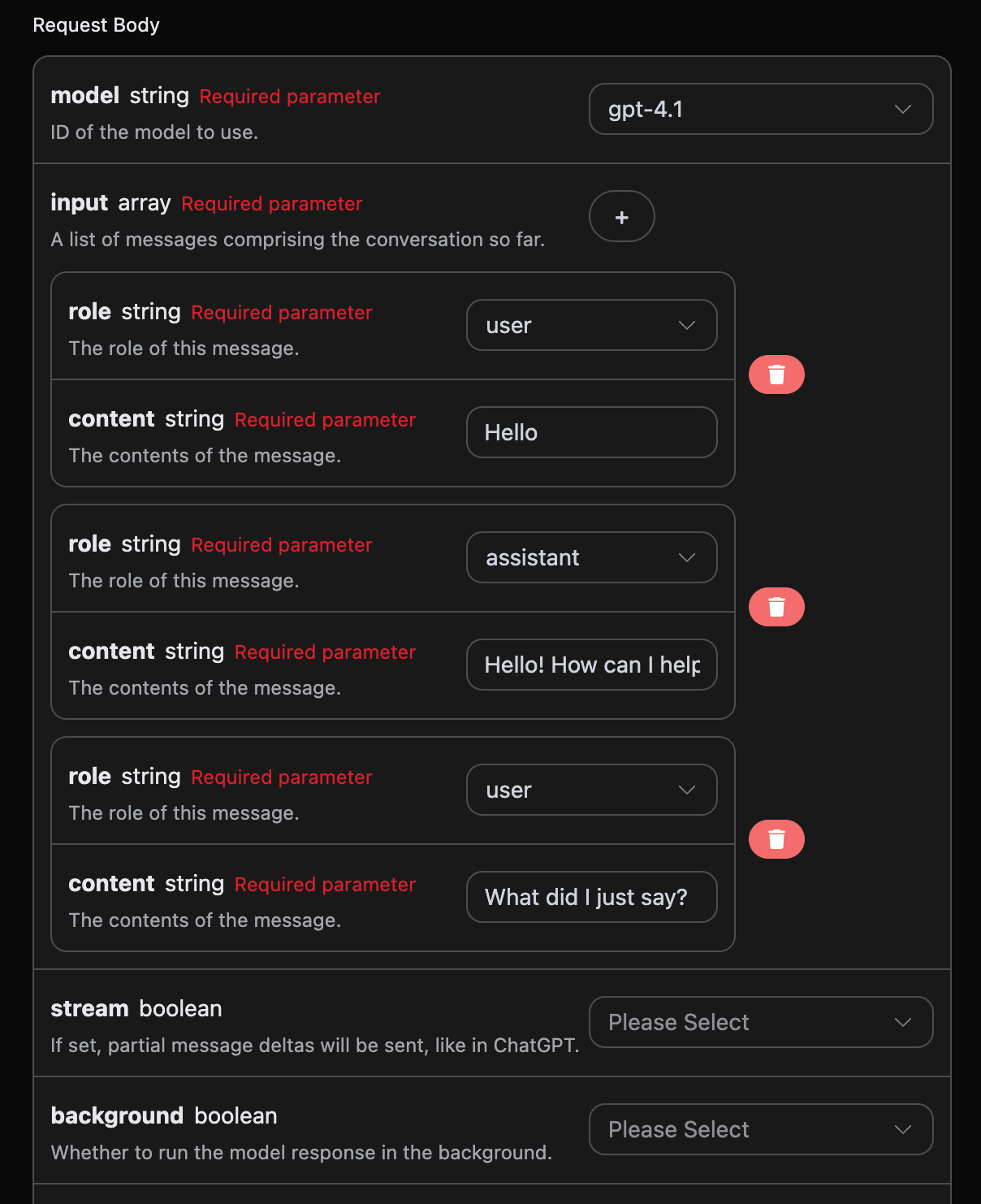
Python サンプル呼び出しコード:
```python theme={null}
import requests
url = "https://api.acedata.cloud/openai/responses"
headers = {
"accept": "application/json",
"authorization": "Bearer {token}",
"content-type": "application/json"
}
payload = {
"model": "gpt-4.1",
"input": [{"role":"user","content":"Hello"},{"role":"assistant","content":"Hello! How can I help you today? 😊"},{"role":"user","content":"What did I just say?"}]
}
response = requests.post(url, json=payload, headers=headers)
print(response.text)
```
複数の質問語をアップロードすることで、簡単にマルチターン会話を実現でき、以下のような回答を得られます。
```json theme={null}
{
"id": "resp_68a989c03c508191a1dd82ce2e37e88a0932a4328c0a5d5b",
"object": "response",
"created_at": 1755941312,
"status": "completed",
"background": false,
"content_filters": null,
"error": null,
"incomplete_details": null,
"instructions": null,
"max_output_tokens": null,
"max_tool_calls": null,
"model": "gpt-4.1",
"output": [
{
"id": "msg_68a989c092e4819189821a9eb8247e1e0932a4328c0a5d5b",
"type": "message",
"status": "completed",
"content": [
{
"type": "output_text",
"annotations": [],
"text": "You just said \"Hello.\" \n\nWould you like to continue the conversation or ask a question?"
}
],
"role": "assistant"
}
],
"parallel_tool_calls": true,
"previous_response_id": null,
"prompt_cache_key": null,
"reasoning": {
"effort": null,
"summary": null
},
"safety_identifier": null,
"service_tier": "default",
"store": true,
"temperature": 1,
"text": {
"format": {
"type": "text"
}
},
"tool_choice": "auto",
"tools": [],
"top_p": 1,
"truncation": "disabled",
"usage": {
"input_tokens": 32,
"input_tokens_details": {
"cached_tokens": 0
},
"output_tokens": 20,
"output_tokens_details": {
"reasoning_tokens": 0
},
"total_tokens": 52
},
"user": null,
"metadata": {}
}
```
`output` に含まれる情報は基本的な使用方法の内容と一致していることが確認できます。これは ChatGPT が複数の会話に対して返信する具体的な内容を含んでおり、このようにして複数の会話内容に基づいて対応する質問に回答できます。
## ビジョンモデル
gpt-4o は OpenAI が開発したマルチモーダル大規模言語モデルであり、GPT-4 をベースに視覚理解能力を追加しています。このモデルはテキストと画像の入力を同時に処理でき、クロスモーダルな理解と生成を実現しています。
gpt-4o モデルを使用したテキスト処理は、上記の基本的な使用内容と一致しています。以下では、モデルの画像処理能力を使用する方法について簡単に紹介します。
gpt-4o モデルの画像処理能力を使用するには、元の `content` 内容に `type` フィールドを追加します。このフィールドにより、アップロードされたものがテキストか画像かを判断でき、gpt-4o モデルの画像処理能力を使用できます。以下では主に、Curl と Python の 2 つの方法でこの機能を呼び出す方法について説明します。
* Curl スクリプト方式
```
curl -X POST 'https://api.acedata.cloud/openai/responses' \
-H 'accept: application/json' \
-H 'authorization: Bearer {token}' \
-H 'content-type: application/json' \
-d '{
"model": "gpt-4.1",
"input": [
{
"role": "user",
"content": [
{"type": "input_text", "text": "what is in this image?"},
{
"type": "input_image",
"image_url": "https://cdn.acedata.cloud/e724d7f13d.png"
}
]
}
]
}'
```
* Python スクリプト方式
```python theme={null}
import requests
url = "https://api.acedata.cloud/openai/chat/completions"
headers = {
"accept": "application/json",
"authorization": "Bearer {token}",
"content-type": "application/json"
}
payload = {
"model": "gpt-4.1",
"input": [
{
"role": "user",
"content": [
{"type": "input_text", "text": "what is in this image?"},
{
"type": "input_image",
"image_url": "https://cdn.acedata.cloud/e724d7f13d.png"
}
]
}
]
}
response = requests.post(url, json=payload, headers=headers)
print(response.text)
```
その後、以下の結果を取得できます。結果内のフィールド情報は上記と一致しており、詳細は以下のとおりです。
```json theme={null}
{
"id": "resp_68a98c1bb784819e9b9f622007a2d37602483949012d2193",
"object": "response",
"created_at": 1755941915,
"status": "completed",
"background": false,
"content_filters": null,
"error": null,
"incomplete_details": null,
"instructions": null,
"max_output_tokens": null,
"max_tool_calls": null,
"model": "gpt-4.1",
"output": [
{
"id": "msg_68a98c1dd030819e97fb71e6ee33f5a902483949012d2193",
"type": "message",
"status": "completed",
"content": [
{
"type": "output_text",
"annotations": [],
"text": "This image shows a scenic path, possibly a boardwalk, running through a lush green field or meadow. The sky above is bright blue with some white clouds, and there are green trees and bushes in the background. It looks like a peaceful nature scene, possibly in a park, wetland, or prairie area. The image conveys a sense of tranquility and natural beauty."
}
],
"role": "assistant"
}
],
"parallel_tool_calls": true,
"previous_response_id": null,
"prompt_cache_key": null,
"reasoning": {
"effort": null,
"summary": null
},
"safety_identifier": null,
"service_tier": "default",
"store": true,
"temperature": 1,
"text": {
"format": {
"type": "text"
}
},
"tool_choice": "auto",
"tools": [],
"top_p": 1,
"truncation": "disabled",
"usage": {
"input_tokens": 1118,
"input_tokens_details": {
"cached_tokens": 0
},
"output_tokens": 75,
"output_tokens_details": {
"reasoning_tokens": 0
},
"total_tokens": 1193
},
"user": null,
"metadata": {}
}
```
回答内容は画像に基づいたものであることが確認できます。そのため、上記の 2 つの方法により、gpt-4.1 モデルのテキストおよび画像処理能力を簡単に使用できます。
gpt-4.1 に加えて、gpt-4o-mini というより低コストなモデルもあります。gpt-4o-mini は OpenAI が開発した最新世代の大規模言語モデルであり、応答速度が速いだけでなく、価格もより安く、マルチモーダルもサポートしています。vision 機能の使用については、上記の gpt-4.1 モデルの使用内容を参照してください。
## ファイル処理モデルの作成
リクエスト例:
```json theme={null}
{
"model": "gpt-4.1",
"input": [
{
"role": "user",
"content": [
{ "type": "input_text", "text": "what is in this file?" },
{
"type": "input_file",
"file_url": "https://cdn.acedata.cloud/assets/examples/fish/64adc04b-c196-4a0f-9070-222ba101ce6c-fc50de38c165.wav"
}
]
}
]
}
```
結果例:
```json theme={null}
{
"id": "resp_68a98d7bb57c819ba25424f5f50a29a300a1af2af822e88a",
"object": "response",
"created_at": 1755942267,
"status": "completed",
"background": false,
"content_filters": null,
"error": null,
"incomplete_details": null,
"instructions": null,
"max_output_tokens": null,
"max_tool_calls": null,
"model": "gpt-4.1",
"output": [
{
"id": "msg_68a98d7d9b80819b9b0f09b7bcd00bf900a1af2af822e88a",
"type": "message",
"status": "completed",
"content": [
{
"type": "output_text",
"annotations": [],
"text": "あなたが投稿したファイルには、取締役会会長であるウォーレン・E・バフェットが執筆した、**バークシャー・ハサウェイ・インクの株主宛て2024年年次書簡**が含まれています。この文書は、通常、バークシャーの株主向け年次報告書に含まれる包括的なコミュニケーションです。\n\n### ファイルの内容:\n\n#### 1. **会長から株主への書簡**\n - **序論と哲学:** ウォーレン・バフェットは、年次報告書の目的、バークシャー・ハサウェイのコミュニケーション・スタイル、ならびに成功と失敗の両方について透明性を持ち率直に議論するという自身の哲学について述べています。\n - **過ちについての議論:** 彼は資本配分と人事判断において犯した過ちについて率直に語り、誤りを認めて迅速に是正することの重要性を強調しています。\n - **後継者に関するコメント:** バフェットは自身のいずれ訪れる引退に言及し、グレッグ・エイベルがCEOおよびこれらの書簡の執筆者として後継者となることを述べています。\n - **逸話的な物語:** バークシャーが買収したForest River(RVメーカー)の創業者であるピート・リーグルの物語は、経営哲学と事業上の意思決定を例示するために語られています。\n\n#### 2. **2024年の事業および財務実績**\n - **主要な結果:** 保険、BNSF鉄道、エネルギーなどの事業セグメント別の営業利益の内訳を含め、2024年と2023年を比較したバークシャーの財務実績の概要。\n - **保険事業:** GEICOおよび損害保険部門は際立った年となり、業界に関する解説と、バークシャーが保険リスク、価格設定、保険「フロート」の投資にどのように取り組んでいるかについてのコメントがあります。\n - **投資:** 大企業(例:Apple、American Express、Coca-Cola)において、事業全体と部分的な持分(市場性のある有価証券)の両方を所有するというバークシャーの戦略、および現金の配分についての議論。\n - **税金:** バークシャーが法人税の支払いにおいて記録を更新したこと(2024年にIRSへ268億ドル)への言及。\n\n#### 3. **長期的な哲学と資本主義に関する論評**\n - **株式について:** バフェットは、バークシャーが現金や債券よりも事業(株式)の所有を優先する理由、および同社が長期投資を好む理由を説明しています。\n - **資本主義について:** 米国の成長、資本主義の役割、貯蓄、そして国家の成功における資本配分についての考察があり、安定した通貨を維持することの重要性にも触れています。\n\n#### 4. **日本への投資**\n - **日本の保有銘柄に関する更新:** バークシャーによる日本の5つの商社への投資拡大と、それらの経営およびガバナンスに対する肯定的な見解。\n\n#### 5. **バークシャー・ハサウェイ年次総会**\n - **年次集会情報:** オマハで開催される年次総会に関する詳細。社交イベント、書籍販売、総会に関連する慈善活動を含みます。\n - **個人的な物語:** 書簡に人間味を加えるため、バフェットの家族(妹のバーティーを含む)にまつわる個人的な逸話。\n\n#### 6. **業績表**\n - **バークシャー対S&P 500(1965年~2024年):** バークシャーの株価の年間変動率とS&P 500のトータルリターン、ならびに長期の複利成長率と総合的な利益を示す、2つの詳細な表。\n\n---\n\n### 要約\n\nこのファイルは、主にウォーレン・バフェットが執筆した**バークシャー・ハサウェイの株主宛て2024年年次書簡**です。事業実績、経営哲学、投資戦略、利益と税金、保険事業、重要な保有銘柄、資本配分、後継者に関する最新情報などを扱っています。表は、ほぼ60年にわたるバークシャー・ハサウェイのS&P 500に対する目覚ましいアウトパフォームを示しており、これは書簡における中心的な誇りの点です。\n\n特定のセクションに関する詳細をご希望の場合は、お知らせください!"
}
],
"role": "assistant"
}
],
"parallel_tool_calls": true,
"previous_response_id": null,
"prompt_cache_key": null,
"reasoning": {
"effort": null,
"summary": null
},
"safety_identifier": null,
"service_tier": "default",
"store": true,
"temperature": 1,
"text": {
"format": {
"type": "text"
}
},
"tool_choice": "auto",
"tools": [],
"top_p": 1,
"truncation": "disabled",
"usage": {
"input_tokens": 8438,
"input_tokens_details": {
"cached_tokens": 0
},
"output_tokens": 731,
"output_tokens_details": {
"reasoning_tokens": 0
},
"total_tokens": 9169
},
"user": null,
"metadata": {}
}
```
ご覧のとおり、入力ファイルについてもファイル処理を行っており、結果は上記と類似しています。
## エラー処理
API を呼び出す際にエラーが発生した場合、API は対応するエラーコードと情報を返します。例:
* `400 token_mismatched`:不正なリクエスト。パラメータの欠落または無効が原因である可能性があります。
* `400 api_not_implemented`:不正なリクエスト。パラメータの欠落または無効が原因である可能性があります。
* `401 invalid_token`:認証されていません。認可トークンが無効または欠落しています。
* `429 too_many_requests`:リクエストが多すぎます。レート制限を超過しています。
* `500 api_error`:内部サーバーエラー。サーバー側で問題が発生しました。
### エラー応答の例
```
{
"success": false,
"error": {
"code": "api_error",
"message": "fetch failed"
},
"trace_id": "2cf86e86-22a4-46e1-ac2f-032c0f2a4e89"
}
```
## 結論
本ドキュメントを通じて、OpenAI Responses API を使用して、公式 OpenAI の Responses 作成機能を容易に実装する方法をご理解いただけたと思います。本ドキュメントが、この API の連携および利用により役立つことを願っています。ご不明な点がございましたら、いつでも弊社の技術サポートチームまでお問い合わせください。
This documentation is built and hosted on [Mintlify](https://mintlify.com), a developer documentation platform.